regress: Visual Regression Between Releases With Playwright and a Shift-Tolerant Diff
Table of contents
Every release has the same quiet question behind it: did we break something we didn’t touch?
Unit tests answer that for the logic, and API tests answer it for the contracts. Neither one looks at the page. A CSS refactor, a dependency upgrade or a moved route can break a screen that every test still passes. A column goes missing, a total is off, a card overlaps a chart. Everything is green, and the page is wrong. The usual safety net is someone clicking through every page before the release, which is slow and misses things.
At work I built a proof of concept to make that click-through mechanical. It worked well enough that I rebuilt it from scratch as an open-source tool, regress, with my own app Nirman as the demo. This post covers the idea, how it works inside, and the problem that almost made the whole approach useless: a few pixels of padding.
The Idea
Don’t write assertions about what each page should look like. Compare each page with how it looked in the last release.
- Bring up the stable version and the new version.
- Give both exactly the same data.
- Open every page in both, the same way, and screenshot it.
- Diff the screenshots and report what changed.
The comparison is the easy part. The hard part is making sure that the only difference between the two screenshots is the code. Different data, a different clock, an animation caught mid-frame or a shifted margin all show up as a diff, and a report where everything is red is as useless as no report at all.
The First Version
The POC at work was simple. Both versions were deployed in the QA environment, each with its own setup. A testing framework posted predefined sample data to both through the API, then triggered the aggregation jobs on both, because the analytics pages, reports and dashboards read from aggregated data, not raw records.
Then the same Playwright script ran against each setup. It visited every feature page of the stable version, took a screenshot, and stored it as feature/<version>/page.png. When both runs were done, a Python script paired the screenshots, compared them pixel by pixel and wrote a report.
The first Python script was generated with Claude, with the Playwright MCP connected so it could open the real pages instead of guessing what they looked like.
That version proved the idea. regress keeps the same shape and fixes what the POC taught me.
One Run, End to End
# real use: two deployed environments, credentials from env vars
python -m regress run -c config/nirman-url.yaml --stable https://a.qa... --new https://b.qa...

# demo / branch review: build two git refs locally
python -m regress run -c config/nirman-git.yaml --open
flowchart TD
A["Load config<br/>run config + app profile"] --> B["Bring the version up<br/>URL: already deployed · git: worktree + up.sh"]
B --> C["Open a frozen browser<br/>fixed clock, timezone, locale, no animations"]
C --> D["Log in with Playwright<br/>read the API token from the page"]
D --> E["Seed the same data through the API<br/>then run aggregation hooks"]
E --> F["Discover pages<br/>pages.yaml features + crawler"]
F --> G["Full-page screenshot per feature<br/>screenshots/feature/label.png"]
G --> H{"new version<br/>done?"}
H -- "no, run it next" --> B
H -- yes --> I["Pair by feature<br/>banded, shift-tolerant diff"]
I --> J["report.html + summary.json<br/>exit code 0 / 1"]Two inputs drive a run. A run config says which two versions to compare and how strict to be. An app profile (apps/<app>/) says how to use the app: how to log in, where the API token lives, what data to seed, which pages exist, and what to mask. Everything app-specific lives in the profile, so the framework in regress/ is the same for every app.
There are two ways to get the versions. URL mode is the real use: two deployed environments, like the QA setup from the POC. Git mode builds two refs of a repository locally with the app’s own up.sh and down.sh, one after the other, on the same ports and origin. That’s how the demo compares Nirman’s main with HEAD~5, and how you’d check a branch before merging it.
Same Data on Both Sides
Two versions with different data differ on every page, so the seed is the foundation. It’s a file of API steps, replayed into each version through its public HTTP API, not the database:
{
  "id": "site_main",
  "method": "POST", "path": "/sites",
  "find": {"path": "/sites", "match": {"name": "Lakeview Villa"}},   // reuse if present
  "body": {"name": "Lakeview Villa", "location": "Whitefield, Bengaluru", "budget": 4500000,
           "start_date": "2026-08-01", "expected_end_date": "2027-06-30"}
}
Going through the API was a deliberate choice. The schema is exactly what changes between releases, and seeding through the API means the new version’s own write path is part of what gets tested. A few details made it survive real use:
findmakes it idempotent. Before creating a record, the step looks for an existing one that matches. Re-running against a shared QA environment doesn’t create duplicates.- Steps reference each other.
{{site_main.id}}uses the id returned by an earlier step, and the same ids fill route parameters like/sites/:siteId. drop_on_422handles schema drift. If the older version rejects a field that only the newer one knows, the step retries without it, so one seed file works for both.post_seed_hookstrigger aggregation. That’s the POC’s “aggregate before you screenshot” step, now a hook that runs after seeding and waits until the jobs finish.
Seeding runs after the Playwright login, because that’s usually when the app hands out its API token. The profile has one line of JavaScript, auth.token_js, that reads it from the logged-in page. For Nirman it pulls the Supabase access token out of localStorage. No separate auth code per app.
Making Screenshots Repeatable
A visual diff is only useful if the same build always produces the same pixels. The browser session removes every source of run-to-run noise it can:
| Source of noise | What regress does |
|---|---|
| ”Today”, “this month”, relative dates | Date.now() frozen to a fixed time that matches the seed data |
| Timezone, locale, number formats | Fixed per profile (Asia/Kolkata, en-IN for Nirman) |
| Animations, transitions, caret blink | Durations set to 0, reduced motion, caret hidden |
| Late data and web fonts | Wait for network idle and document.fonts.ready, then a short settle |
| Avatars, tokens, live timestamps | masks paint them magenta, hide makes them invisible |
| HiDPI, scrollbars, service workers | Scale factor 1, scrollbars hidden, service workers blocked |
The check for all of this is simple: compare a build with itself. If anything differs, something is still nondeterministic. On Nirman, two self-compare runs captured 10 and then 12 features, and every one passed at 0.0% mismatch.
Pairing by Feature, Not URL
The POC paired screenshots by folder: same feature, same file name, two version folders. That works until a route moves. Nirman’s ledger moved from /ledger to /sites/:siteId between releases. Paired by URL, that’s one removed page and one added page, and the comparison you wanted never happens.
So pages are named by what they are, in pages.yaml, with candidate routes in order:
features:
  ledger:  { routes: ["/sites/:siteId", "/ledger"] }
  reports: { routes: ["/sites/:siteId/summary", "/reports"] }
Each version tries the routes in order and keeps the first one that loads without redirecting. A crawler also walks the app’s links, so a page nobody listed is still captured, as auto_<path>. Features that exist only in the new version are reported as added, and features that disappeared as removed, instead of being silently skipped.
The Padding Problem
In the POC, the first real runs flagged nearly every page as changed.
Nothing was broken. A shared style in the new release had added a few pixels of padding to a common container. Everything below it moved down, and a strict pixel-by-pixel comparison sees a few pixels of shift as every pixel below that line being different. One harmless CSS change buried every real difference under noise. The fix in the POC was to make the comparison tolerant of small shifts, and to make that tolerance a buffer you configure when running the test.
regress keeps the buffer and makes it smarter. A single global offset only helps when the whole page moves. Usually it’s part of the page: the header stays put and the content under it moves 6 px. So the diff splits the page into horizontal bands (120 px tall by default), and each band finds its own best alignment within shift_px:
for y0 in range(0, h, band_h):
    a_band = a[y0:y0 + band_h]
    best = band_mask(a_band, b, y0, dy=0, dx=0)          # try (0, 0) first
    if best.sum() and shift:
        # best vertical offset first, then horizontal around it
        for dy in range(-shift, shift + 1):
            ...keep the offset with the fewest mismatched pixels
        for dx in range(-shift, shift + 1):
            ...
    mask[y0:y0 + band_h] = best
Movement gets absorbed band by band. Content that actually changed doesn’t, because no offset makes a wider card or a missing column go away. Around that core:
- Colour distance is perceptual, using the same YIQ metric as pixelmatch, so
color_thresholdignores anti-aliasing and tiny colour shifts. - The offset search is separable: vertical first, then horizontal around the best one. That’s
2·(2·shift+1)tries per band instead of(2·shift+1)². - Lone pixels are dropped. A mismatched pixel with no mismatched neighbour is anti-aliasing noise, not a regression.
- A page that grew still fails. Rows beyond the stable height plus the shift are counted as changed, so new content at the bottom of a page isn’t silently passed.
- A page passes when its mismatch is at most
max_mismatch_pct(0.5% by default), with per-feature overrides for pages that are naturally noisier.
The behaviour is pinned by tests on synthetic pages: an identical page passes, a 6 px padding shift fails with shift_px: 0 and passes with shift_px: 8, and a real new box still fails with the buffer on.
The buffer is still a trade-off. The bigger it is, the more genuine small shifts it forgives. That’s why it’s a setting, in the config, per feature, or on the command line, and why you can re-diff an old run without recapturing:
python -m regress compare -c config/nirman-git.yaml --run runs/<id> --shift-px 0Capturing takes minutes. Re-diffing takes seconds, so tuning the buffer against real screenshots is cheap.
What a Real Run Looks Like
Here’s the git-mode demo: Nirman’s HEAD~5 (0005aef) against main (16fd6da), five commits that included a redesign. Of 12 features, 9 failed and 3 were added (add_entry, me, updates, pages that didn’t exist five commits ago). The failures ranged from 3.7% of pixels on the sites page to 12.9% on reports, and on every failed page the diff realigned 5 to 7 bands by up to 8 px before counting what was left.
That last part is the point. The shift buffer absorbed the movement, and what’s still red is real change. Here’s the home page diff, with the stable page washed out to grey and the changed pixels in red:
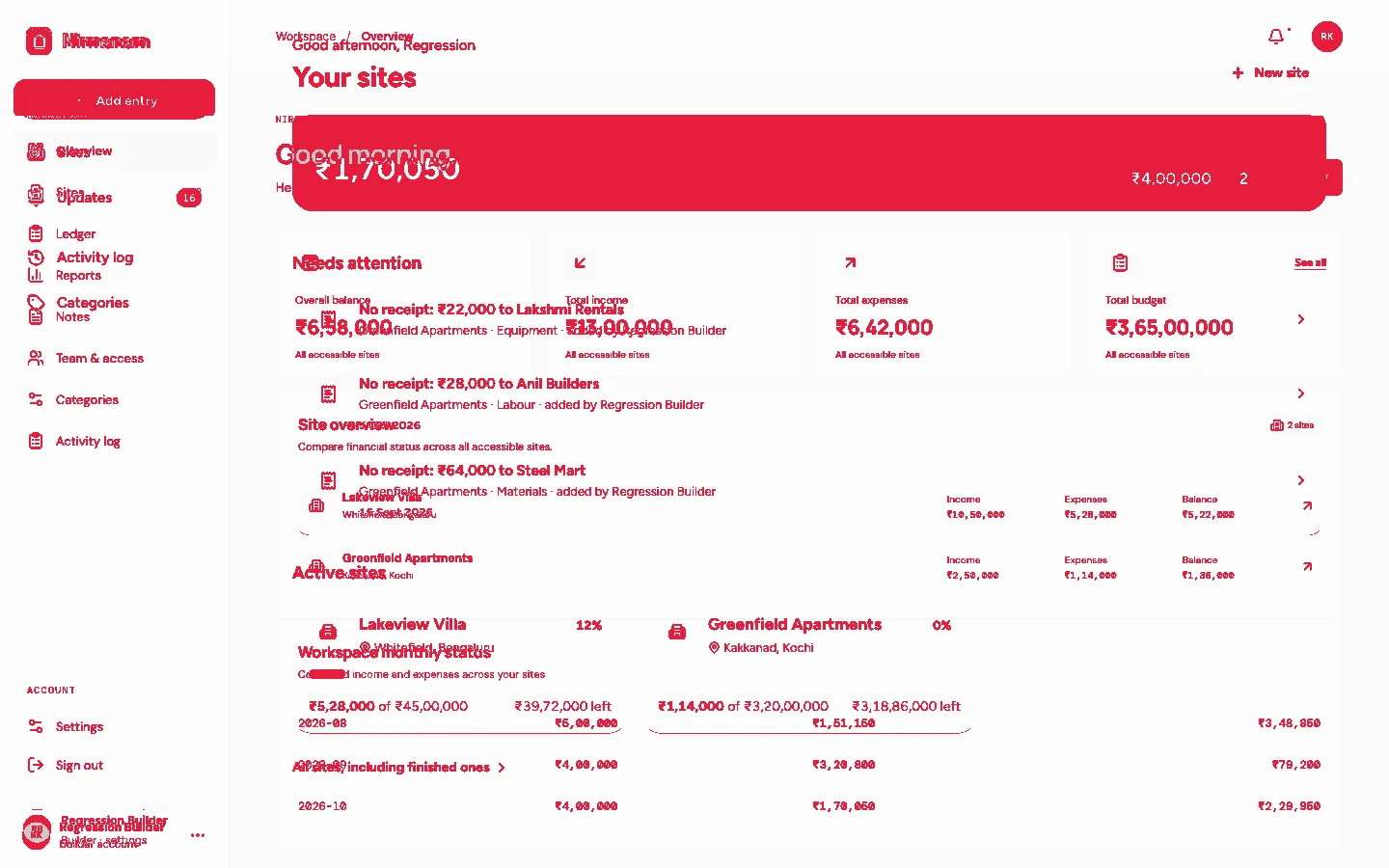
The home page was rebuilt: new greeting, a “Needs attention” list, different cards. A shift buffer can’t hide that, and shouldn’t.
The report puts failed pages first. Each one shows stable, new and diff side by side, with a slider overlay to scrub between the two versions, and filter chips by status:
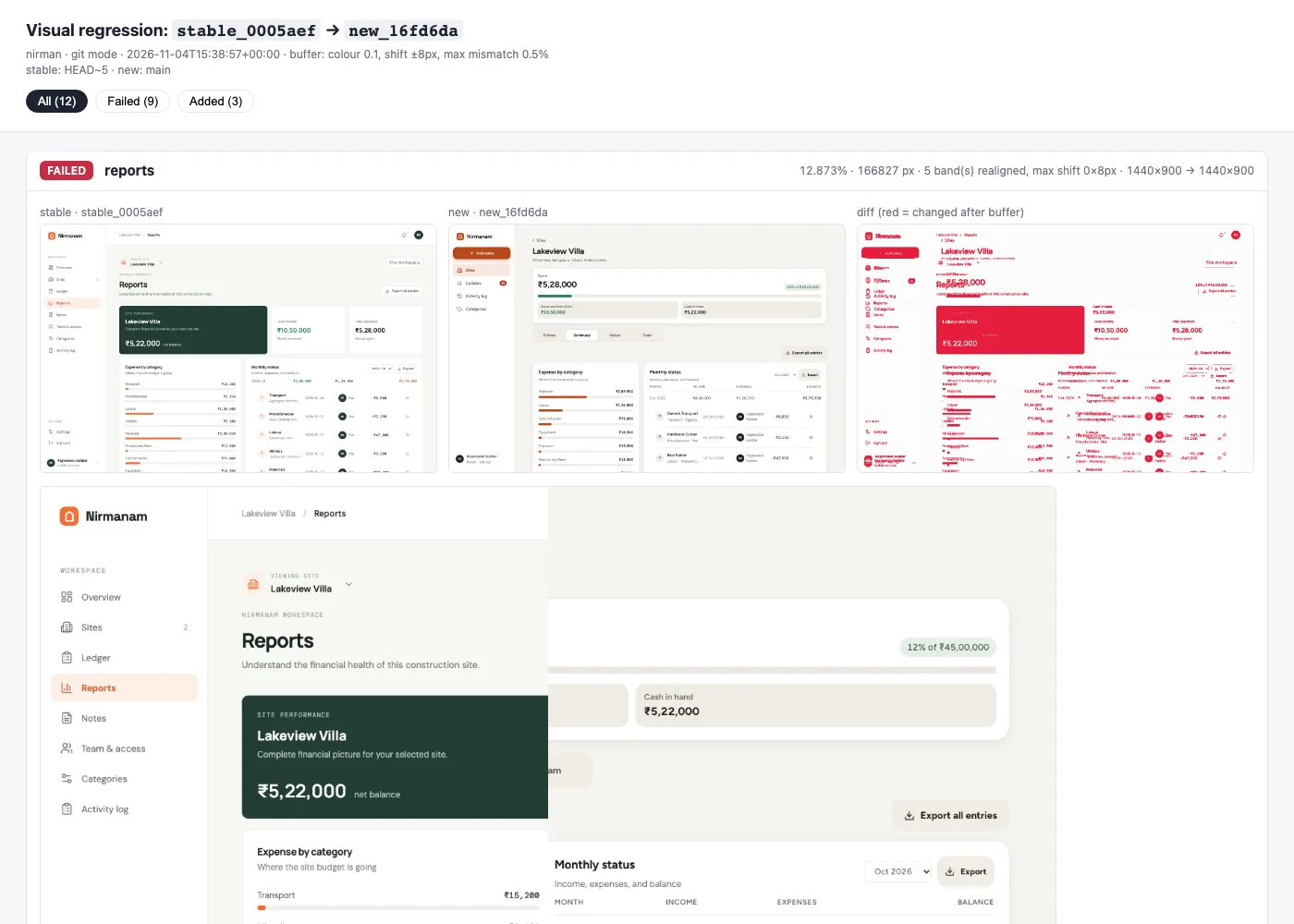
Open the full sample report → It’s the unedited report.html from this run, with all 12 features, the filter chips and the slider. Drag the slider on any failed page to scrub between the two versions.
Next to the report, summary.json has the per-page status, mismatch percentage and offsets, and the exit code is 1 if anything failed or errored. A pipeline can gate a release on it, and a person can review the report in a few minutes.
Where Claude Came In
In the POC, Claude with the Playwright MCP wrote the first comparison script. In regress, that idea became two Claude Code skills in the repository.
/generate-playwright-script is the one that matters most, because the per-app setup is the real work. It explores a running app through the Playwright MCP: logs in, finds stable selectors for the login form, works out where the API token lives (localStorage, a cookie or an Authorization header in the network requests), walks every nav link, tab and modal, replaces IDs in URLs with route parameters, and looks for unstable regions to mask, like clocks, relative times and avatars. Then it writes profile.yaml, pages.yaml and, only if YAML can’t express something, a capture.py.
Then it checks its own work the same way you would: it points both targets at the same build and runs a capture. Every feature should pass at about 0%. A non-zero mismatch on the same build means flakiness, so it adds a mask or a wait and runs again. A model that can open the real pages writes a capture setup for this app, not a generic one, and the self-compare tells it when it’s wrong.
/visual-regression runs a comparison and summarises the report, so “compare QA with prod” is one request.
The padding problem, though, only showed up when the POC met a real release. No amount of generation up front would have found it. As I wrote in SDLC That Loops Back, the useful loop is the one that comes back with evidence from the real thing.
Limits
- Pixels, not DOM. It shows what users see, but it doesn’t tell you why something changed. The diff points you at the page, and you read the commit.
- Chromium only. Cross-browser differences are out of scope.
- Truly dynamic content like live feeds, ads or third-party widgets has to be masked, hidden or frozen. The buffer won’t absorb it.
- Git mode runs the versions one after another, so both see the same ports and origin. The cost is two build cycles per run.
- It’s not a replacement for functional tests. It answers one question very well, and only that one.
Key Takeaways
- Compare against the last release, not against a spec. “What changed since stable?” can be answered for every page without writing an assertion for each one.
- Control the data, or the diff means nothing. Seed both versions through the API with the same data, then run their own aggregations.
- Kill nondeterminism before you diff. Freeze the clock, fix the locale, stop animations, and prove it by comparing a build with itself.
- Pair pages by what they are, not where they live. Feature keys survive moved routes.
- Plan for layout shift from day one. One shared style change can flag every page. A banded, configurable shift buffer keeps the report readable.
- Let AI do the per-app setup, with eyes on the app. With the Playwright MCP, Claude explores the real pages and verifies its own capture setup against a self-compare.
If you want to try it, the repository has the Nirman demo, which builds two refs locally with Docker and the Supabase CLI:
python3 -m venv .venv && .venv/bin/pip install -r requirements.txt && .venv/bin/playwright install chromium.venv/bin/python -m regress run -c config/nirman-git.yaml --openFor your own app, run /generate-playwright-script in Claude Code against a running instance, or follow the adding a new repo guide.